

Are you confused how to use Pinterest? Does creating pin images, editing board descriptions and repinning pins make your head spin? Don’t fret! Let me help you understand how to use Pinterest.
How to use Pinterest for Complete Beginners
Pinterest is a visual search engine. People go to Pinterest to discover new ideas. They go there to explore.
Pinterest is much more like Google, than Facebook.
As a consumer, when you’re on Pinterest, you’re planning future birthday parties, a dinner for a special occasion or a new wardrobe.
For bloggers, Pinterest is gold.
Consumers are looking for blog posts on Pinterest. They want your recipe on the best chicken pot pie. They’re looking for your top tips for new moms. They want to find your blog!
Update 2021
Hey there! Pinterest and Tailwind have changed a lot over the years. I’m currently testing out a new strategy to get traffic to my blog and can’t wait to share it with you! If you’d like to know more about it once I’m ready to share it, please sign up to my email list using any of the yellow buttons. I’ll share more about it in my Monday emails.
Hugs, Suzi
How do you use Pinterest as a blogger
How do you actually get your blog posts on Pinterest?
I made a few step by step videos for you below. To clear up any confusion you have about Pinterest and to show you step by step how to use the platform.
How to Use Pinterest Overview
How to Setup Your Profile and Claim Your Website – Basic Setup – Video 1
- How to create a Business account on Pinterest
- How to create boards on Pinterest, and what type of boards you should create
- How to setup your profile correctly on Pinterest for your blog
- How to connect and validate your website or blog with Pinterest’s meta tag
How to Pin on Pinterest
How to Create Pin Images and Put Them On Pinterest – Video 2
- How to create pin images in PicMonkey (here is a free course on how I use PicMonkey)
- I use PicMonkey to edit my own images
- How to create pin images in Canva
- I use Canva for quick pin images using stock photos
- How to add images to your blog post
- How to put your pin images on Pinterest
- How to hide images within your blog post
- <div style=”display:none;”> IMAGE CODE </div>
How to Use Pinterest – Pinning Strategies
If you’d like to learn a bit more advanced topics on how to use Pinterest, below are my techniques:
Pinterest is a Visual Search Enginge
If you haven’t discovered this yet, Pinterest is a huge visual search and discovery engine, or as I like to call it, it’s a Dream Builder. I use Pinterest to build my dream baby boy nursery, or my ultra fun kid friendly backyard, or the six pack I hope to one day have, or the recipes I want to make for the holidays.
Your profile, pin and board descriptions need to include keywords describing your niche. This enables Pinterest to quickly categorize and show your pin for the right search queries. I cover this in the videos above, so make sure to check them out!
What Size Should My Pins be?
The current rule from Pinterest is that 600×900 pixels is the preferred pin size – this can also be referred to as a 2:3 scale image.
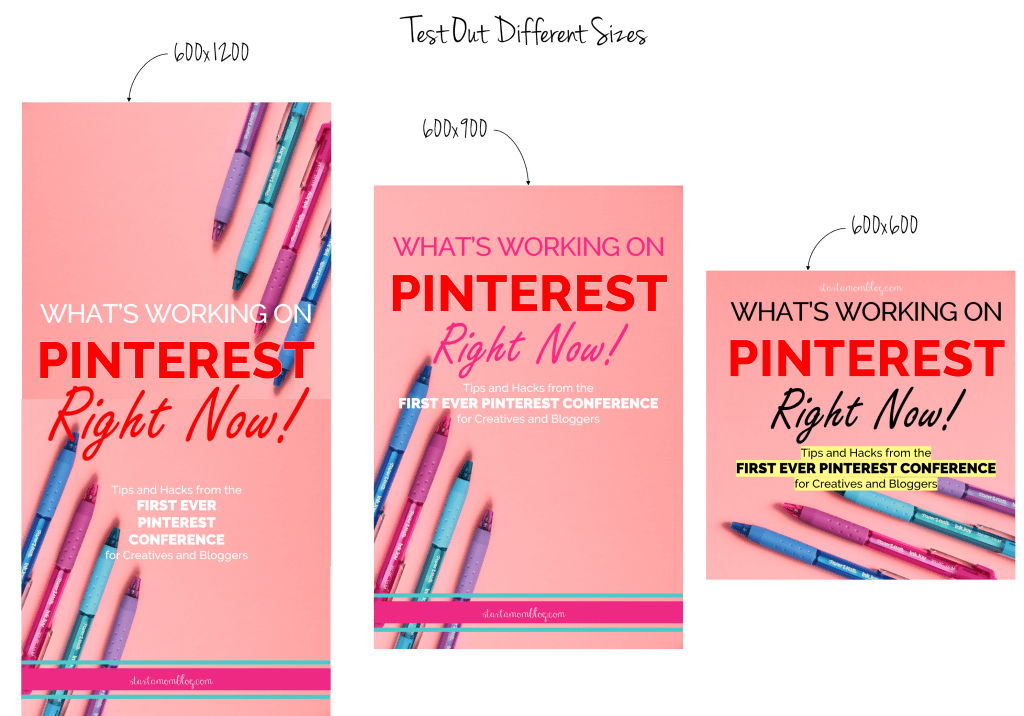
The maximum pin size you can do is 600×1200 pixels. However, if someone is searching for chicken recipes and there is a pin that is 600×900 and one that is 600×1200, the larger pin is taking 30% more space on your screen. For the longer pin to show up first in the results it has to have 30% more engagement than the smaller pin.
Make sense right? Basically, you have to earn the real estate space. It makes sense to create both a 600×900 and 600×1200 pin. And don’t be afraid to try out square pins too, I’ve heard some friends get great results form them! Create multiple sized pins for all of your blog posts. Watch the video above to see how I quickly create multiple pins within minutes. And bonus, this also counts as new content which makes Pinterest happy!
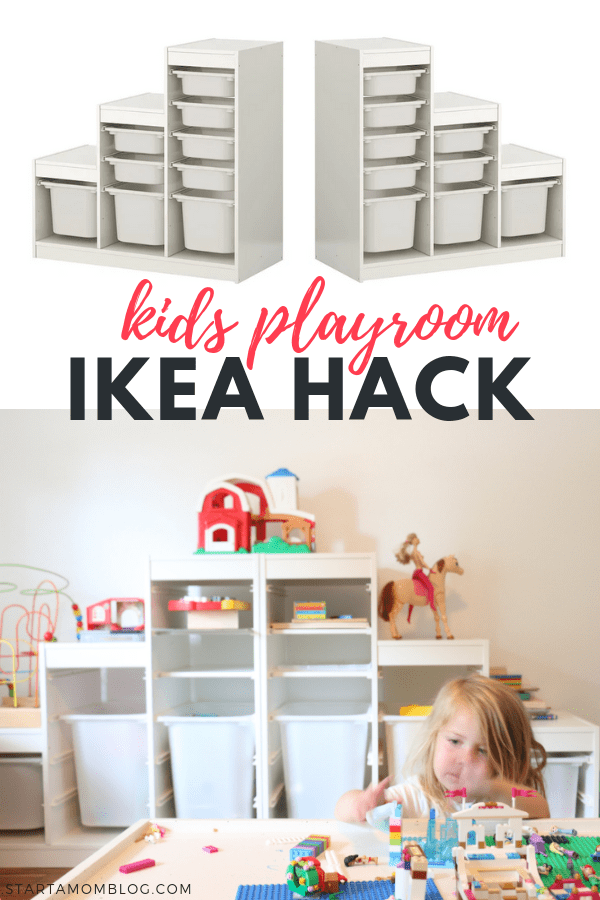
The image below was created in about 5 minutes with Canva (see the video above.) It’s a ratio of 2:3, uses clear text and shows a real life example of the tip. When you promote a product or service, your recommendations will convert higher if you actually show yourself using the product.
From the image below you can see we adore the IKEA Trofast storage units. Each child as one and it houses all of their toys. If it doesn’t fit in their “tower”, we donate it.
You may be worried you’re adding too much text? The 20% text rule is only for Facebook. Pinterest loves text.
Pro Tip: The more straightforward and helpful the copy the better. Add clear and descriptive text that will entice readers to click through.
Should I Brand my Pins?
Use your branding, such as your logo, elegantly. Pinterest wants you to use branding to help your pins stand out in a sea of pins that look alike.
Pinterest wants your followers to recognize your content when they see it, and branding helps.
Even thought I do it sometimes, they advise not to put your logo at the bottom right because there are Pinterest buttons that may cover it up.
How Many Pins am I Allowed to Pin per Day?
There is no limit, but if you repin the same image over and over and over again, your account could be marked as spam.
Spread out pinning your posts on Pinterest. One way is to schedule your content to be pinned with Tailwind. (You can see my current process here and my past strategy here and sign up for Tailwind here.)
Quick Tips:
- Be sure that what you are pinning is relevant to your content.
- Pin 5 of your own pins a day to relevant boards.
- After publishing a post, I will upload a pin the same day and pin that to my own 2 boards for my blog.
- Then I will repin it to one of my related boards and to group boards. I never repin the same pin twice in one day.
- If I repin one of my pins to my DIY board, I will not repin it to a group board on the same day.
Here is a visual representation of how I use Pinterest and Tailwind.
Is There a Perfect Pin Strategy?
There are different ways to be successful on Pinterest which is why you will hear a wide variety of tips and advice from bloggers. Be true to yourself, test things out, and see what works for you. The same advice doesn’t work for everyone, so don’t be afraid to experiment.
How Do I Write Great Headlines for my Pins?
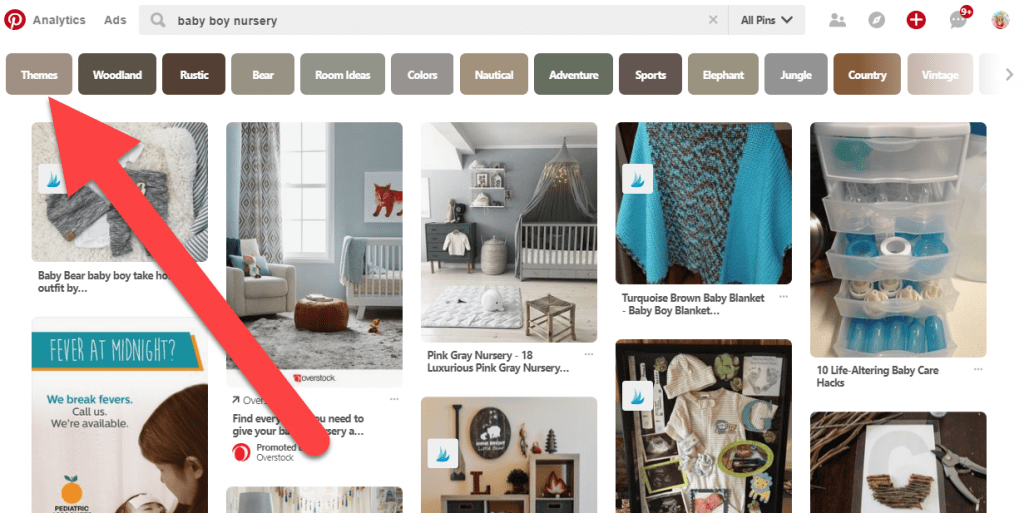
I search for my headlines in Pinterest before I post it to see what is coming up in the search. When you do that you will see keywords right below the search bar. They go in order of popularity.
These popular keywords should be used in your description, in your title, and on your pin.
For the example below, Baby Boy Nurseries Themes are the most popular search term, followed by Baby Boy Woodland Nursery etc.
Using this little trick can also help you come up with popular blog post ideas!
How to Use Pinterest
I hope the videos and tips above help you use Pinterest as a beginner. Setting up your profile and connecting your blog isn’t hard, just a little tricky when you’re brand new. And there’s no mystery to get a pin on Pinterest. You can do it today! Make sure to watch the videos above if you’re still confused.
Once you understand the basics of how to use Pinterest, you’ll be a pro at creating cute pin images and driving tons of traffic to your blog! Let me know below if you have any questions, I’m always here to help!
If you found this post helpful, would you be a great friend and share it with others?