Close Menu
  • Home
  • Make Money
  • Mom Life
  • Spiritual Growth & Mindset
  • Nurse Life
  • Finance
What's Hot

25 Cute Valentine Wood Crafts You Can Make & Sell

December 27, 2025

Roller Skating as an Adult, Finding My Balance Again

December 8, 2025

How to Make Money with a Photography Blog

December 8, 2025

Subscribe to Updates

Inspire. Empower. Thrive – Straight to Your Inbox.

Facebook X (Twitter) Instagram
Facebook X (Twitter) Instagram Pinterest
Her Blogging EraHer Blogging Era
Saturday, March 7
  • Home
  • Make Money
  • Mom Life
  • Spiritual Growth & Mindset
  • Nurse Life
  • Finance
Her Blogging EraHer Blogging Era
  • About Me
  • Contact
  • Privacy Policy
  • Terms & Conditions
Home»Make Money»10 Minutes: How to Setup an Email Account That Uses Your Domain Name through SiteGround
Make Money

10 Minutes: How to Setup an Email Account That Uses Your Domain Name through SiteGround

November 6, 2025No Comments4 Mins Read
Facebook Twitter Pinterest LinkedIn Tumblr WhatsApp VKontakte Email
Share
Facebook Twitter LinkedIn Pinterest Email

How to Setup an Email Account That Uses Your Domain Name

If you’re a blogger and you’re serious about growing your business, you are diligently working on growing your email list. And I know how much effort it takes to gain those subscribers. So when you do send them an email with your latest post or product, you want it to reach them, right?

If you’re @gmail.com – you may be going to spam!

But sadly, if you haven’t heard, emails ending with “@gmail.com” are being filtered to the Promotions tab, or worse yet, the Spam folder.

Here is how to prevent that from happening. If you set up your email through your domain name, such as [email protected], instead of [email protected], your emails won’t automatically go to the spam folder. Yipppee!!

Below are the quick steps on how to setup your email at your domain name if you host through SiteGround. (By the way, if you’re looking for a hosting company, I love SiteGround. They are always on, super fast, and their helpful and kind technical support is amazing! And they save me hours of work when they solve my technical issues for me!)


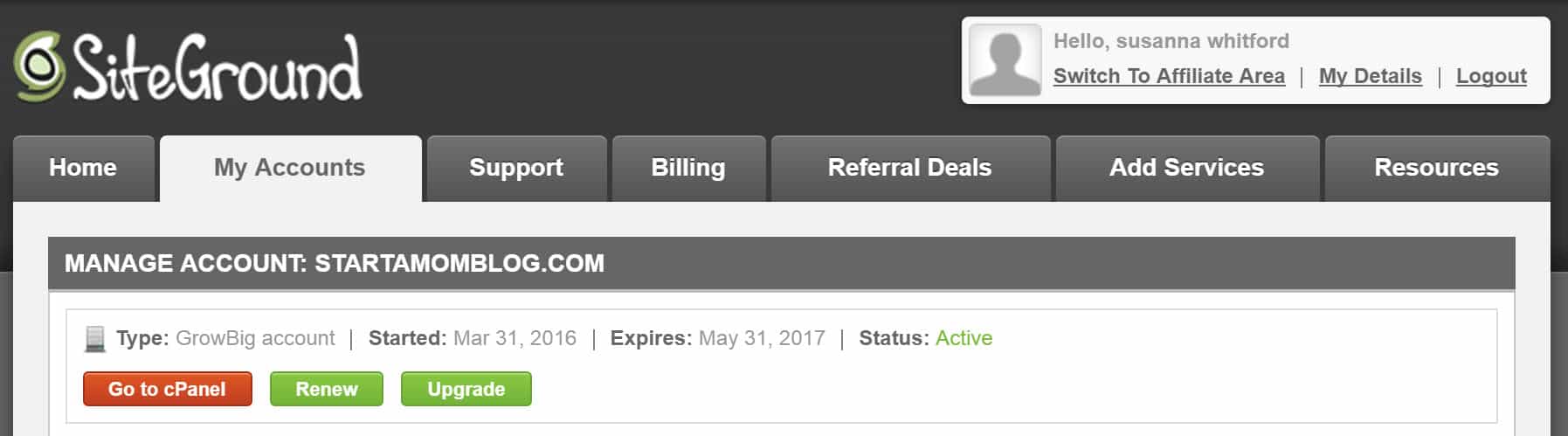
1. Go to your cPanel under My Accounts.
1


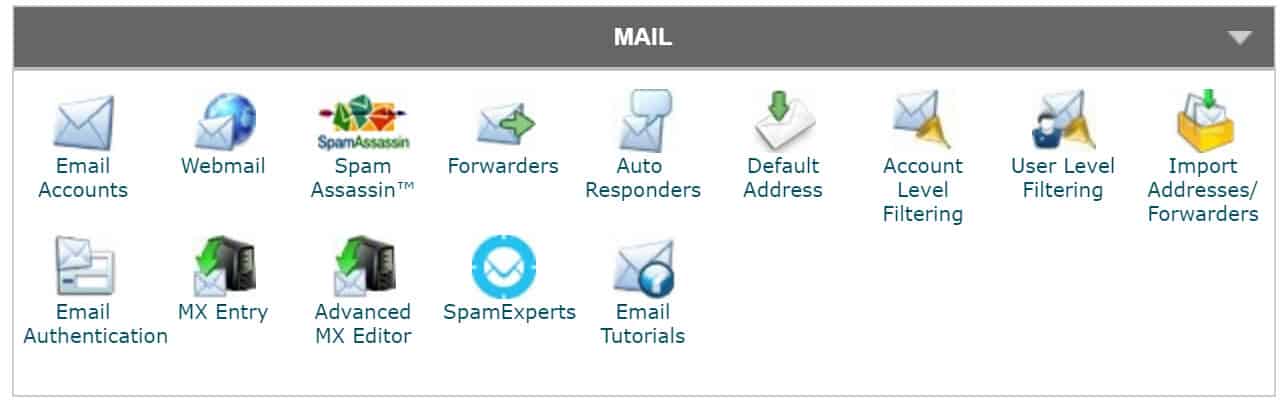
2. Click on Email Accounts.

2


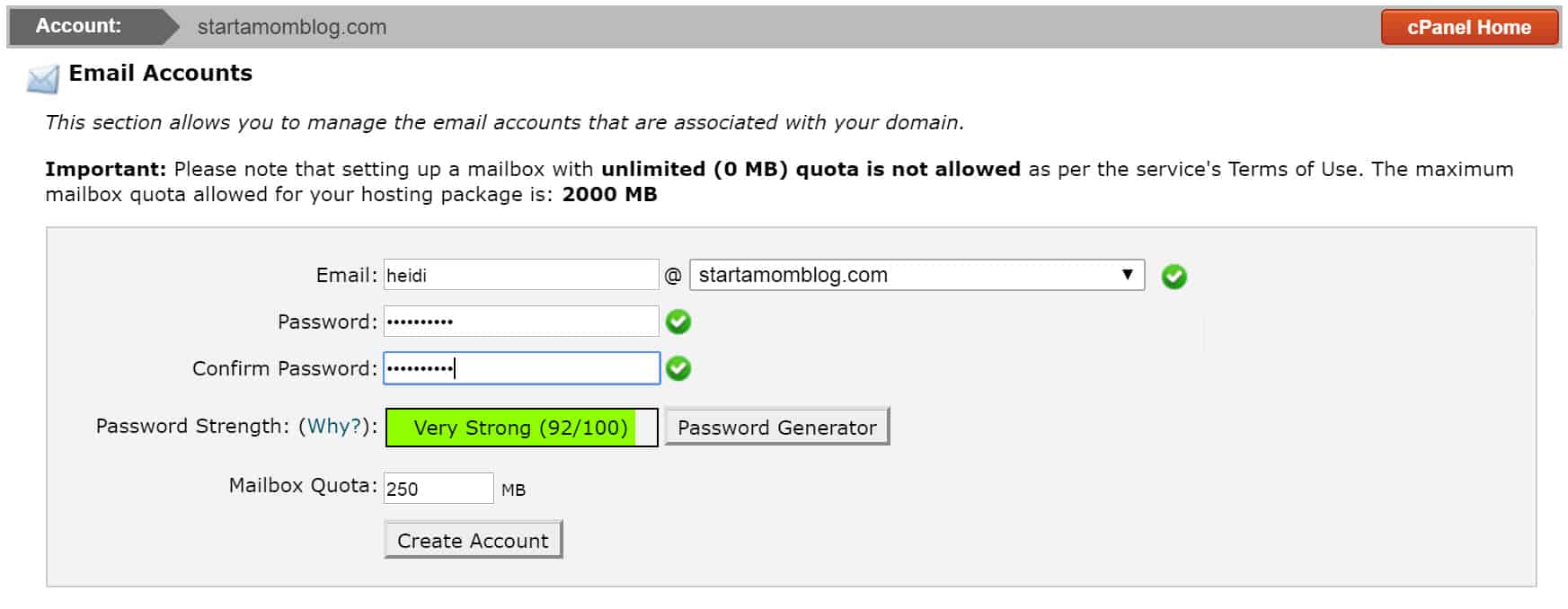
3. Type in the email you want to have at your domain name. Choose a secure password.

(*This is the same password and username you will use when setting up your alias in Gmail)
3


4. Your email is created.

4


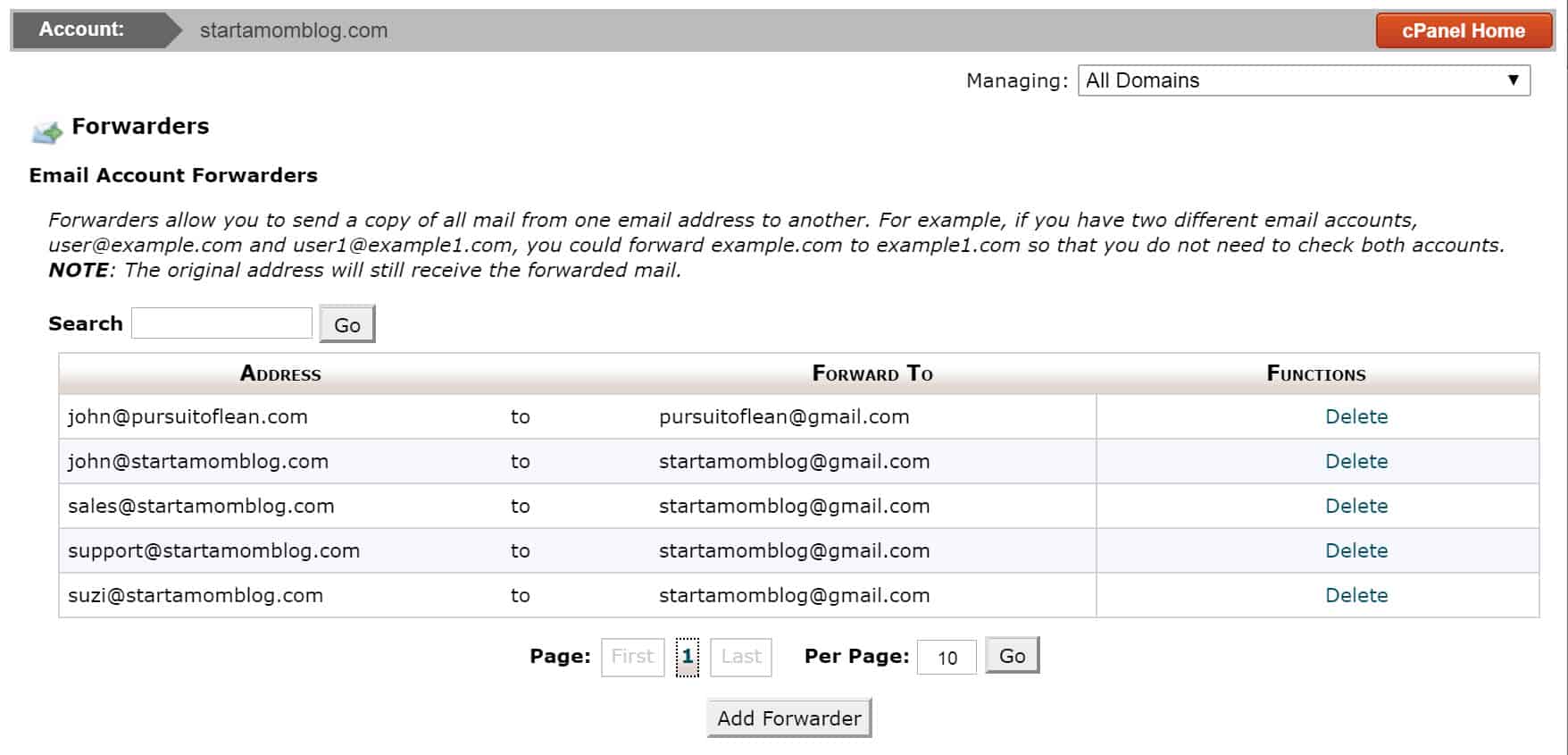
5. Setup forwarding to Gmail. Go to the cPanel home and click on Forwarders.

2


See also  How to build a successful blog with a small niche

6. Click on Add Forwarder.

5


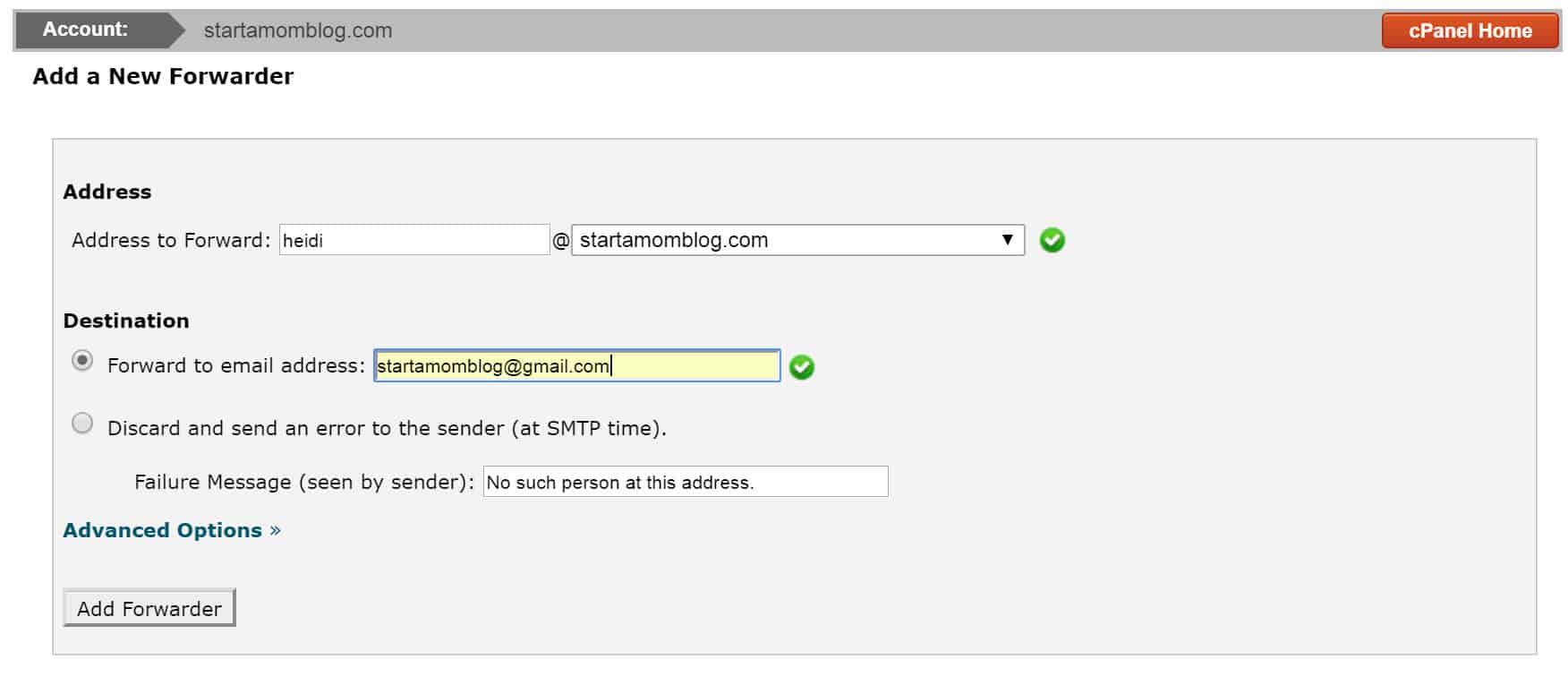
7. Type in the email address you just created.

Then type in the email address you want it to forward to (your Gmail account email).
6


8. Forwarding is setup!

7

9. Now setup your alias in Gmail.

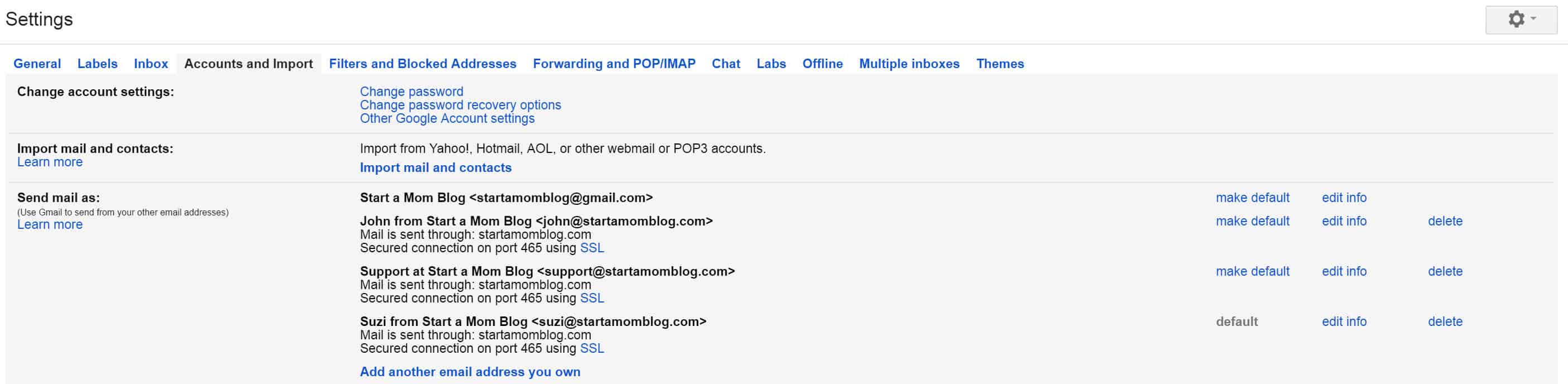
This allows you to still use Gmail to manage your emails but all your outgoing emails will have your domain name email, instead of your gmail email. 🙂 Go to Settings (under the little gear on the right) and click on Accounts and Import. Then click on Add another email address you own.
8


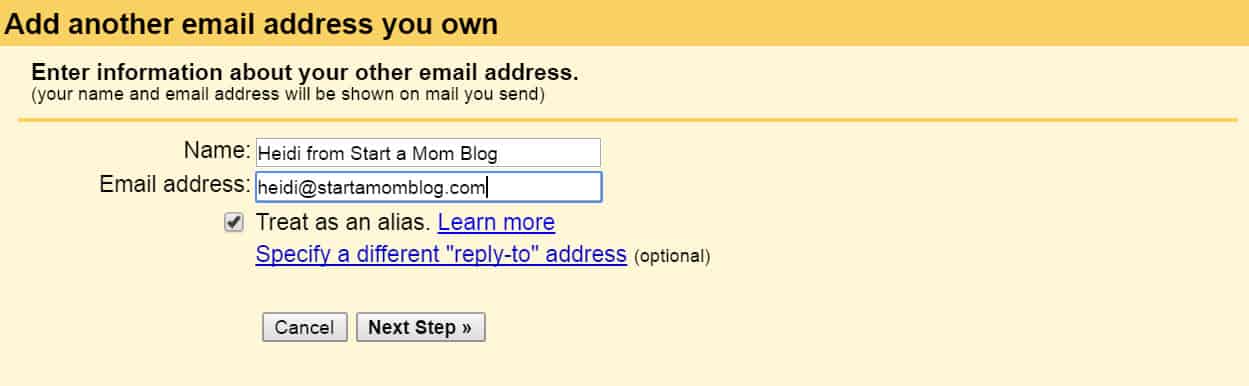
10. Type in your new fancy domain name email address.

Give it a good name too.
9


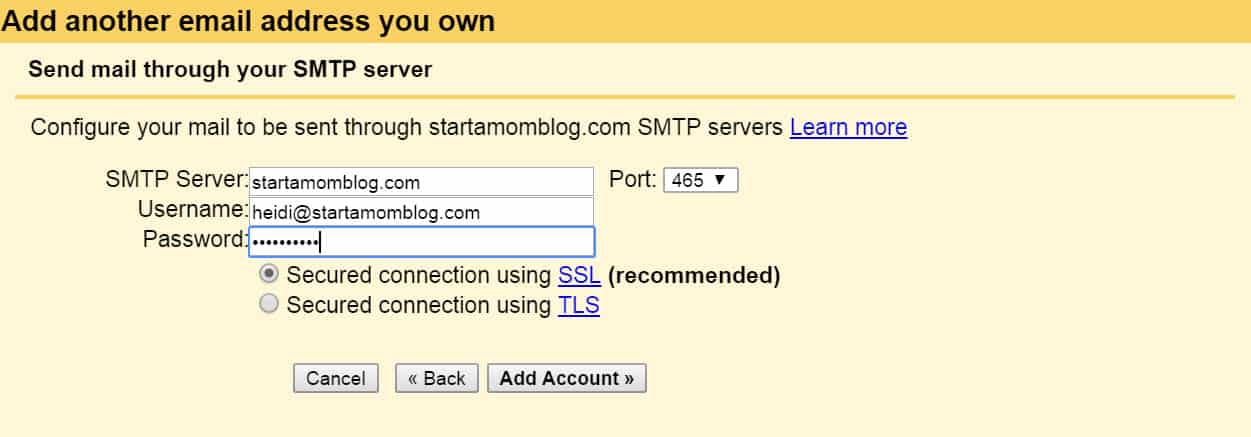
11. Send mail through your SMTP server.

With SiteGround, match the values below. The SMTP Server is your domain name (delete any preceding values). Choose Port 465. Then type in your domain name email and the password you created in step 3.
10


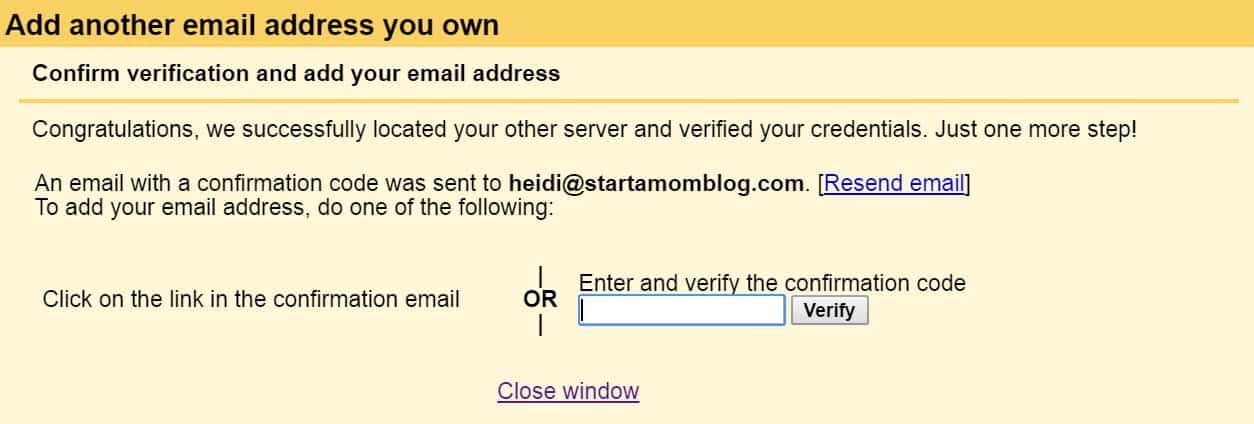
12. Verify your new email.

A verification email will be sent to you to ensure you own this email. And because you already setup forwarding in SiteGround, this email will be in your Gmail account.
11


13. The verification email was under my Updates tab.

It may take a few minutes to be delivered, so don’t fret. Go get a cup of coffee.

12


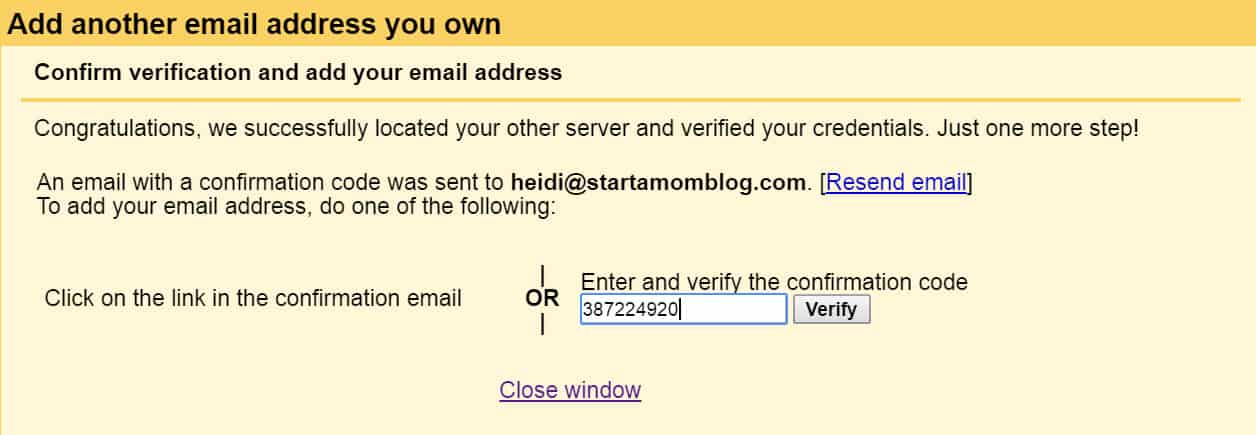
14. Type in the verification code and hit Verify.
13


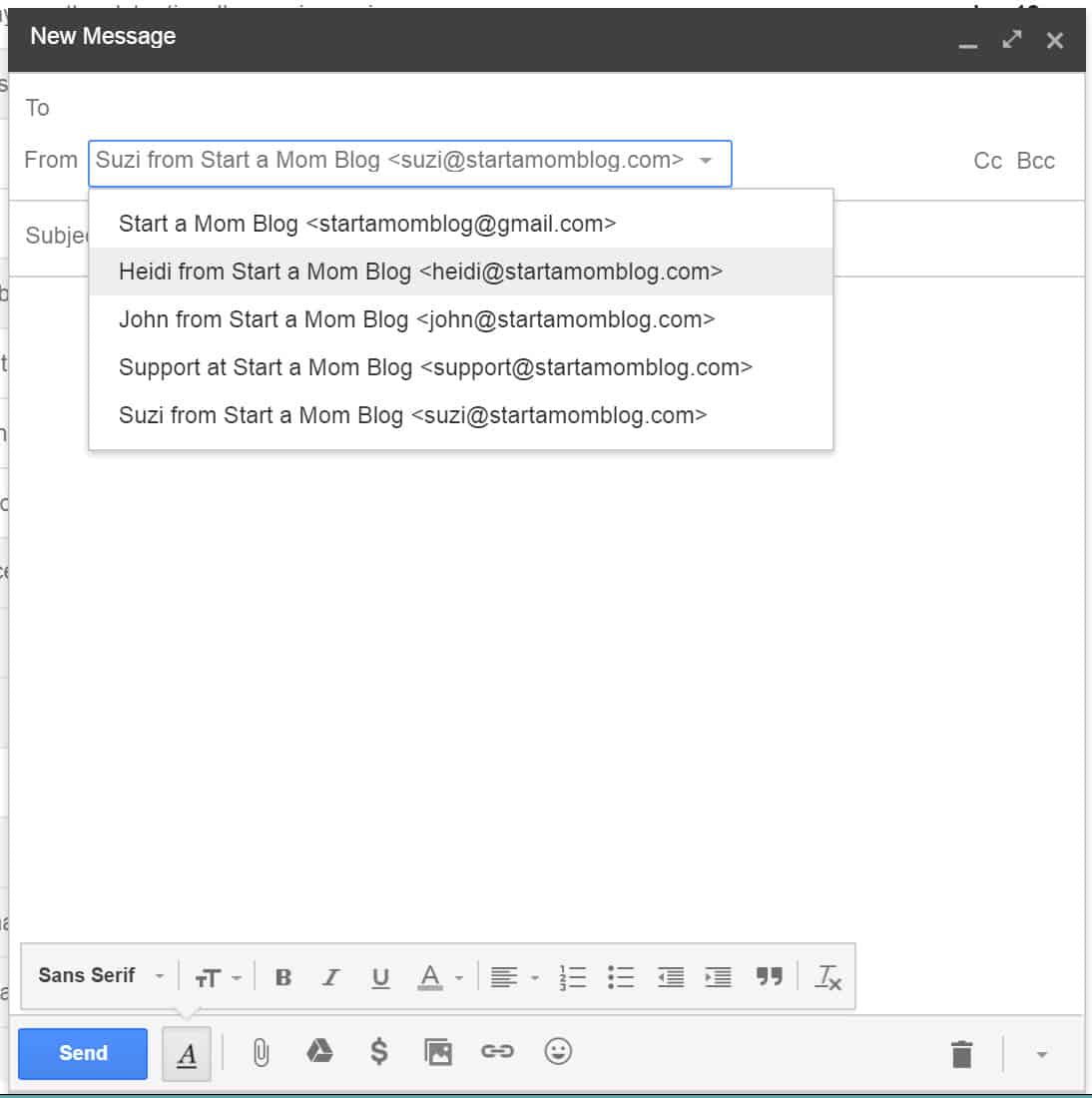
15. Choose from which email to send emails.

Now you are able to send emails with your new domain name email. Super fancy eh?
See also  The Power of 10 Minutes: Quick Organizing Projects You Can Tackle Anytime

14


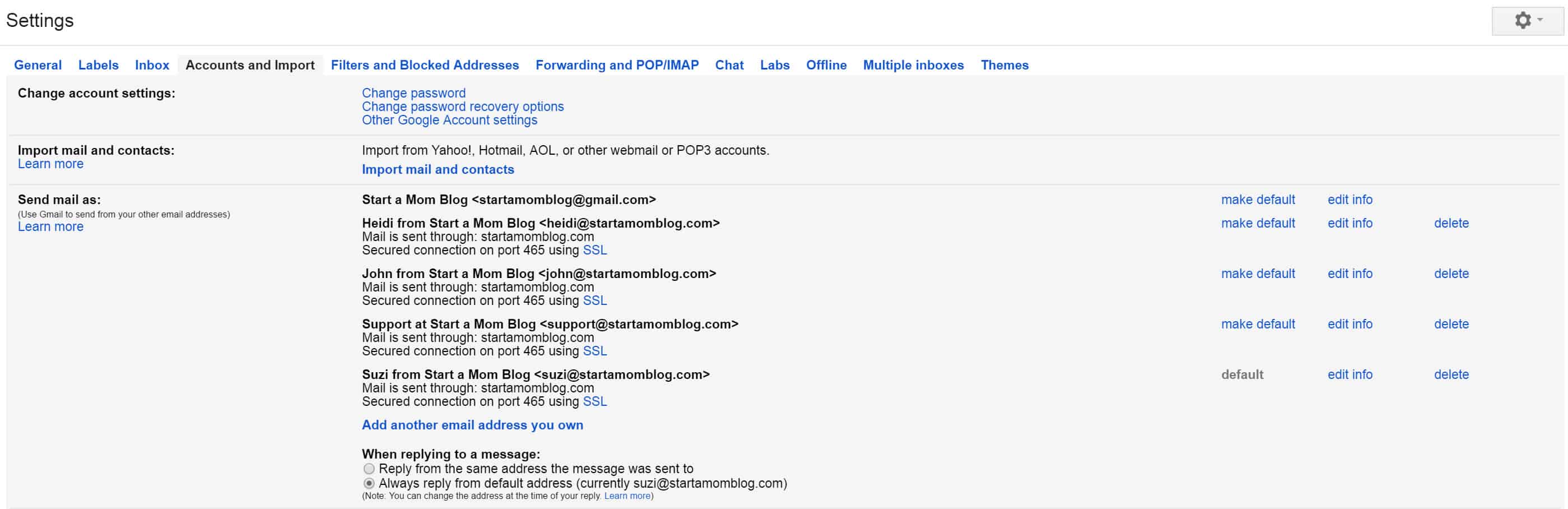
16. Setup default Send As email.

You can also setup your default Send mail as email. Just go to Settings in your Gmail account. And under Accounts and Import, select the email you want to always be the default Send mail as email.
15

Did this help you?

I hope this was easy and simple to follow. Let me know if you have any questions. This should increase your open rate when you send emails to your subscribers! Yippeee – don’t let all your hard work end up in the spam folder.

 

100% Free Blogging Course!

Get the exact plan I followed to grow my blog from $0 to over $9,000 per month in my first year.

Account Domain email Minutes Setup SiteGround
Share. Facebook Twitter Pinterest LinkedIn Tumblr WhatsApp Email
Previous ArticleThe Best Kids Activity Blogs
Next Article Blogging for Moms – Popular + Successful Mom Blogs

Related Posts

25 Cute Valentine Wood Crafts You Can Make & Sell

December 27, 2025

How to Make Money with a Photography Blog

December 8, 2025

How to Start and Make Money with a Kids Activity Blog

December 7, 2025

3 Bad Habits That Stop Moms from Starting a Blog

December 6, 2025

Comments are closed.

Our Picks

40+ ChatGPT Prompts for Moms

November 2, 2025

How to Make $1,000+ in a Week

October 1, 2025

How to Grow a Blog to 1 Million Page Views

October 12, 2025

Free Printable: SAHM Savings Tracker

October 16, 2025
  • Facebook
  • Twitter
  • Pinterest
  • Instagram
Don't Miss
Make Money

25 Cute Valentine Wood Crafts You Can Make & Sell

December 27, 20250

If Valentine’s Day sneaks up on you every year and you suddenly feel the urge…

Roller Skating as an Adult, Finding My Balance Again

December 8, 2025

How to Make Money with a Photography Blog

December 8, 2025

Social Media Ban and Children’s Online Privacy

December 7, 2025
About Us
About Us

Empowering moms and nurses with tips on making money, embracing spirituality, and balancing life’s journey with purpose, passion, and peace.

We're accepting new partnerships right now.

Facebook X (Twitter) Instagram Pinterest
Our Picks

7 Ultimate Reasons Why You Should Choose Origin Mattress

October 14, 2025

43 Easy and Flexible Side Jobs You Can Start Today

August 7, 2025

6 Powerful Ways To Get Closer To God Spiritually

October 14, 2025

Ultimate Guide to Sell Services Online

July 18, 2025
Popular

How To Stay Strategic With Your Credit Card Spending

August 3, 2025

What is a Blog? – Start a Mom Blog

October 18, 2025

The Rise of Mini Minimalism: Parents Love SHEIN’s Soft, Breathable Kidswear

July 18, 2025

What To Look For In A Good Running Pram

October 5, 2025
  • About Me
  • Contact
  • Privacy Policy
  • Terms & Conditions
© 2026 herbloggingera.com - All rights reserved.

Type above and press Enter to search. Press Esc to cancel.